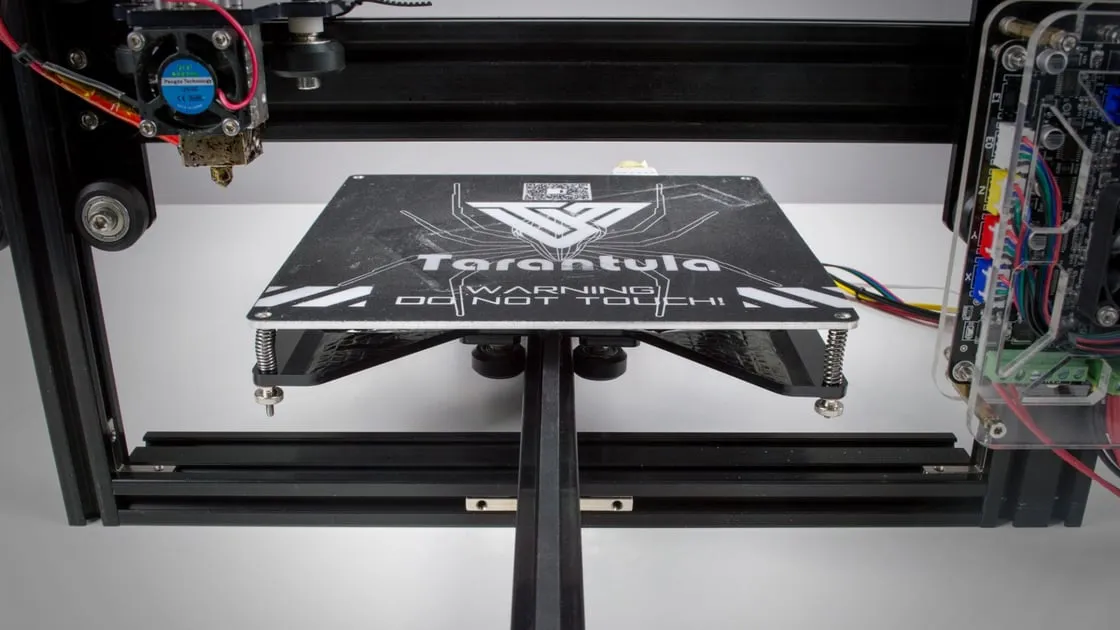
Unboxing and Preparation
Embarking on the journey of building a Tevo Tarantula 3D printer can be an exciting endeavor. The first step involves unboxing all the components and ensuring everything listed in the parts list is present. Carefully inspect each part for any damage that may have occurred during shipping. Organize your components, separating them into logical groups such as frame parts, electronics, and hardware. This initial organization is vital for streamlining the assembly process. Take inventory, and use the provided manual. Place all the components on a clean, well-lit workspace. Ensure that you have enough space to spread out the various parts and tools. Proper preparation significantly reduces frustration and potential delays during the build. Moreover, taking photos throughout the build process can be immensely helpful for troubleshooting later on. Documenting the steps can serve as a handy reference if you encounter any difficulties or need to revisit earlier stages. This will make building process much easier.
Gathering Your Tools
Having the right tools is essential for a successful Tevo Tarantula build. While the kit includes some necessary tools, it is best to supplement them with a few additional items. The quality of your tools can directly impact the ease and accuracy of the assembly. Ensure you have a dedicated workspace where you can spread out and organize your tools and components. This will help to keep things tidy and make it easier to find what you need when you need it. Don’t be afraid to invest in good quality tools. They will last longer and make the entire experience more enjoyable. Make sure to keep all of your tools clean and organized and keep them in a place that is easy to access. These tools will make the build process much easier and more enjoyable.
Essential Tools

Essential tools are fundamental for building the Tevo Tarantula. These tools will be used frequently throughout the assembly process and significantly affect the outcome. An Allen wrench set (hex keys) is crucial for tightening screws, often provided with the kit, but a high-quality set with various sizes will improve the process. A set of small screwdrivers (Phillips and flathead) is needed for electrical connections and adjusting various components. Wire cutters and strippers will be necessary for preparing wires for connections. A digital multimeter is useful for verifying electrical connections and diagnosing problems. A set of pliers for gripping, bending, and cutting. A good quality set of these tools is an investment that will serve you well for this and future projects.
Non-Essential but Helpful Tools
While not strictly necessary, some tools can significantly enhance the building experience. A set of precision tweezers will aid in handling small parts and wires. A small parts organizer will help to keep screws and other small components sorted and easily accessible. A helping hand tool (with magnifying glass) can hold parts in place while you’re working on them, especially when soldering or making intricate connections. Zip ties or cable management clips are useful for organizing and securing wires, which improves both the appearance and functionality of the printer. A metal ruler or calipers for accurate measurements and alignment. These tools, while not mandatory, can contribute to a cleaner, more efficient, and more enjoyable build.
Frame Assembly
The frame is the foundation of your Tevo Tarantula 3D printer. It provides the structural integrity needed for precise movements. Carefully follow the instructions, and start by assembling the base. Ensure that all the frame components are aligned correctly and the screws are tightened securely. Incorrect frame assembly can lead to many problems down the line, including print quality issues and mechanical failures. Double-check all connections to ensure they are square and level. Consider using a square to make sure the frame is perfectly perpendicular. The frame’s rigidity is crucial for the printer’s overall stability. Take your time and carefully assemble each section, and be sure to reference the instructions and accompanying diagrams to confirm that you are assembling everything correctly. The stability of the printer is the first step to quality prints.
Leveling the Frame

Once the frame is assembled, the next critical step is leveling it. A level frame ensures that the print bed is perfectly parallel to the nozzle, which is crucial for the first layer adhesion. Use a spirit level to check the frame’s horizontal and vertical alignment. This step is essential to ensure accurate printing. If the frame isn’t level, your prints won’t adhere to the print bed. Make adjustments as necessary until the frame is perfectly level on all sides. This step can be challenging, so take your time and make small adjustments. The level frame sets the stage for successful printing. Having a level frame also helps ensure all the components are properly aligned.
Installing the Y-Axis
The Y-axis, which controls the bed’s forward and backward movement, is the next major component to install. The installation process usually involves attaching the Y-axis rails and belt to the frame. Align the rails precisely, and securely fasten them to the frame. Make sure the belt is properly tensioned. Too loose, and the bed will wobble; too tight, and the motor will struggle. Following the manufacturer’s instructions for belt tensioning is crucial. Proper Y-axis installation is a key part of getting smooth, consistent prints. Check all the screws to make sure they are tightened. The Y-axis needs to move smoothly along its rails to create quality prints. Ensure the Y-axis moves smoothly, without any binding or resistance. Adjust the belt tension to optimize movement.
X-Axis Assembly
The X-axis, which controls the print head’s left and right movement, requires careful assembly. Follow the instructions for installing the X-axis components, including the belt, rails, and the carriage that holds the print head. Precise alignment of the X-axis rails is critical for smooth and accurate movement. Ensure the belt is properly tensioned, and the carriage moves freely along the rails. The X-axis is critical to getting accurate prints. Double-check that the print head moves smoothly. Make sure the belt tension is appropriate, as improper tension can affect print quality. Regular maintenance and inspection of the X-axis assembly will also help extend the lifespan of your printer. During the assembly process, make sure all parts are secured.
Attaching the Print Head

The print head, which includes the hot end, extruder, and cooling fan, is the heart of the 3D printing process. Attach the print head to the X-axis carriage according to the instructions. The alignment of the print head and the nozzle is extremely important. Ensure that the nozzle is properly aligned with the print bed. This will determine the height of the first layer. Connecting the wiring for the print head, including the heating element, thermistor, and fan, correctly is also vital. Incorrect wiring can lead to malfunctions or safety hazards. Double-check all connections and verify their functionality. Make sure the print head assembly is securely attached to the X-axis carriage and that the wiring is properly routed to prevent interference with the printer’s movements. Ensure that the nozzle is correctly installed and the thermistor is securely in place.
Wiring and Electronics
Wiring and electronics are key to a functional printer. This step involves connecting the motors, endstops, heating elements, thermistors, and other components to the control board. Ensure all connections are secure and the wires are correctly routed to avoid interference with the printer’s movement. Follow the wiring diagrams provided in the instructions, and double-check all connections. Pay close attention to polarity, and make sure the wires are connected to the correct terminals. Miswiring can damage components. Consider using wire management techniques, such as zip ties or cable clips, to keep the wires organized and prevent them from getting tangled or snagged. This will improve the printer’s reliability. Take your time with this process, as any errors here can lead to malfunctions. Always double-check every connection before moving on to the next step.
Connecting the Motors
Connecting the stepper motors correctly is essential for proper movement. The motors control the X, Y, and Z axes, as well as the extruder. Ensure that the motor wires are connected to the correct drivers on the control board. Correct wiring is essential for the motors to move in the correct direction. Double-check the wiring, and verify the motor’s movement by issuing commands through the printer’s control panel. In the event that the motor moves in the wrong direction, it may be required to reverse the wiring. Proper motor connections will make the printer function much better.
Power Supply and Control Board Wiring

Wiring the power supply and control board is a critical step and demands careful attention. Always double-check all connections to ensure they are secure and safe. Follow the wiring diagrams provided in the instructions and connect the power supply to the control board. Wiring the power supply requires careful attention. Incorrect wiring could damage the printer. Make sure the wiring is correct. Double-check that the connections are secure. Check the voltage settings on the power supply to match your local electrical standards. This will make the printer fully operational. Ensure that the power supply is properly grounded to ensure safety.
Firmware and Calibration
Firmware and calibration are crucial for the printer’s optimal performance. These are essential for achieving the desired print quality. Firmware is the software that controls the printer’s operations, and calibration adjusts settings to ensure accurate printing. This stage can be a bit more technical, but it’s essential for making your 3D printer work properly. Without this, prints won’t be as good as they can be. Make sure to follow the steps in the instructions for flashing the firmware. After setting up the firmware, it is time to calibrate the printer. Use the printer’s control panel to fine-tune various settings, such as bed leveling, and the Z-offset.
Flashing the Firmware
Flashing the firmware onto the control board updates the printer’s software. This is an essential step. The firmware manages the printer’s functions, including motor control, temperature regulation, and communication with the computer. To flash the firmware, you will typically need to download the appropriate firmware file, connect your printer to your computer, and use software like Arduino IDE or other firmware flashing tools. Be sure to follow the instructions provided in the guide, and select the correct board and settings. After the firmware is installed, the printer may require a restart. Ensure the printer is correctly recognized by the software. This step is critical for making the printer work correctly.
Bed Leveling and Calibration

Bed leveling and calibration are essential for good print quality. Bed leveling ensures that the distance between the nozzle and the print bed is consistent across the entire surface. The printer needs to be calibrated. Use the printer’s control panel to adjust the bed level. This process often involves using the auto-leveling feature, or manually adjusting the bed’s height at different points. Bed leveling is a key component. Once the bed is level, you can proceed with other calibration steps. The Z-offset is the distance between the nozzle and the print bed. Setting the Z-offset correctly will ensure that the first layer of your print adheres properly to the bed, and the first layer is correct. After the Z-offset is set, it’s time to calibrate the printer. This usually involves adjusting the steps per mm for each axis. Calibrating these settings will help the printer produce high-quality prints. This is what leads to getting good results.
First Print Troubleshooting
After completing the build and calibration, it is time for the first print. Select a simple test print from your slicer software, and send it to your printer. This test print will help to identify any potential problems with the printer. Observe the printer’s behavior during the first print. If you encounter any issues, such as the nozzle not adhering to the bed or the layers not sticking together, this indicates that you may need to recalibrate your printer. Do not panic if the first print is not perfect. It is very common to have to make adjustments and re-calibrate. Take notes of the issues, and consult the troubleshooting guide. The first print is a learning opportunity. Troubleshooting can be an iterative process, so keep trying and making adjustments until you get satisfactory results. Take this as a learning experience. Do not give up if the first print is not perfect; this is normal and requires further steps.